


Welcome to the Popup Maker Family—Come Grow with Us!
For over 10 years, Popup Maker has been a leader in WordPress conversion optimization, delivering powerful, full-featured popup functionalities.
With the start of 2025, we’re kicking off a new chapter—and we want you to be part of the journey.
To strengthen our connection with you, our valued users, we’re launching a new community to foster direct engagement and collaboration. While popups remain our core focus, we’re expanding the conversation to cover all major Conversion Rate Optimization (CRO) topics. Over the next year, we’ll open dedicated spaces for discussions on email opt-ins, funnels, analytics, and more—adapting to demand as the community grows.
For those seeking even deeper involvement, our Optimize plan provides exclusive access to a private members-only area. As an Optimize member, you’ll enjoy prioritized requests, an outsized voice in polling, and more opportunities to shape the future of Popup Maker.
What you can look forward to in the Popup Maker Community:
So, what’s in it for you?
- Exclusive Product Updates & Sneak Peeks: Be the first to learn about new features, updates, and what’s coming next.
- Expert Guidance from the Team & Community: Get help from Popup Maker pros and experienced users to solve your challenges.
- Tips, Tricks & Case Studies: Discover actionable strategies to improve your conversions and see real-world success stories.
- Your Voice in Future Development: Participate in polls and discussions to shape the direction of Popup Maker.
- Early Access to Beta Features: Test new tools before they launch and provide feedback directly to the team.
- Community Spotlights & Recognition: Showcase your work and inspire others with your popup success stories.
- Exclusive Offers & Rewards: Enjoy special deals and perks available only to community members.
- Networking Opportunities: Connect with other creators, marketers, and developers to share ideas and insights.
What we hope to see from you, the community:
What’s in it for us?
- Real-Time Feedback on Features: Tell us what works, what doesn’t, and what you need next.
- Inspiration for Case Studies: Share your success stories to help others and highlight the power of Popup Maker.
- Collaboration with 3rd Party Developers: Explore integrations and extensions that expand what Popup Maker can achieve.
- Engaged Participation in Polls: Help us prioritize features and focus on what matters most to you.
- Support & Mentorship for Others: Share tips and strategies to help new users succeed.
- Showcasing Creative Uses: Demonstrate innovative ways you’re leveraging Popup Maker in your projects.
How to Get Involved Right Away:
-
Introduce Yourself: Say hello and share your goals for using Popup Maker in our Get Started area.
Need a starting point? Tell us about your favorite popup or what you’re hoping to achieve!
-
Show Off Your Popups: Post examples of your work to inspire others and get feedback
-
Explore Topics: Dive into tips, tricks, and tutorials or ask questions to the community.
-
Participate in Polls: Cast your vote and influence the future direction of Popup Maker.
-
Stay Updated: Watch for announcements, special events, and beta testing opportunities.
We’re excited to have you here and can’t wait to see what we’ll build together—welcome to the community!

I'm confused on why my top banner pop up title is not changing as I change the pop up content. No matter what I change, the title is still "Test Message - with Test Link." and the pop-up button is "Test Link". Does anyone know how I might change this?
It is easy to measure which popup gets more conversions. It is harder to know whether the popup caused those conversions at all.
Popup Maker Pro's new holdout tests reserve part of your traffic for visitors who never see the popup. That gives you a real control group and helps answer a better question: what extra lift did the popup create?
If you are starting today, pick one high-traffic popup, use its real conversion as the goal, and avoid changing anything else while the test gathers traffic.
What is the first popup decision you would want a test to settle?

I'm stumped - I've got 'stacked' on for two popups (one acts as a banner, the other as a store redirect option). I can have one or the other open at the same time but they just won't both work at the same time. Known issue?

Hi, I've written a website for a small local museum. It all works pretty well, but the popups behave differently on these two pages:
https://eastsurreymuseum.com/history-of-esm/
https://eastsurreymuseum.com/recent-acquisitions/
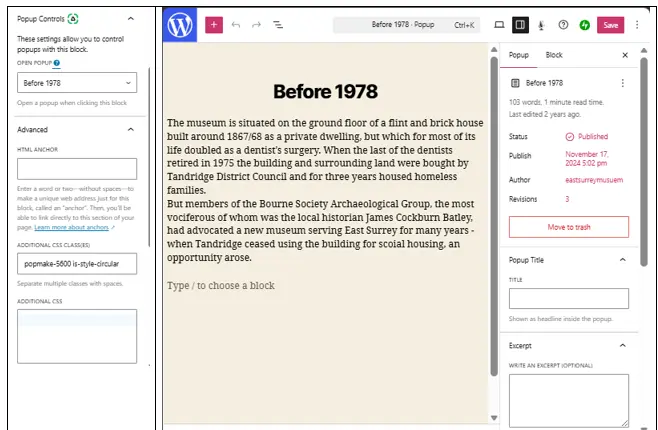
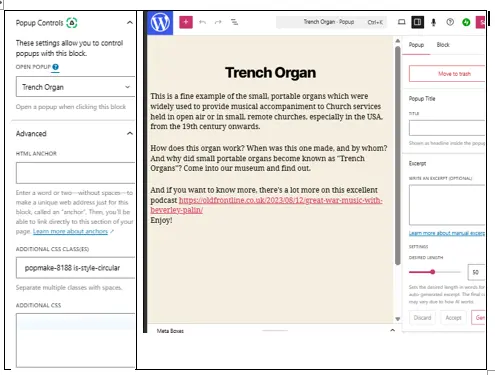
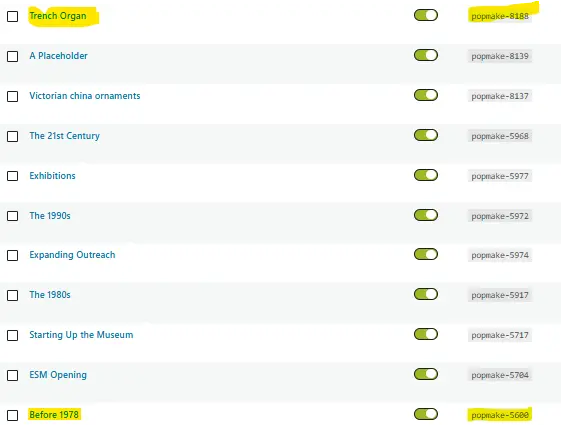
If you click on "Our building 1867-1978" in the former, you'll see a rectangular popup, which only covers a small part of its parent screen, but f you click on "Trench Organ" in the latter, the popup covers the whole page.
I can't see why - please see the attached screen grabs - and I can't find a way of changing the popup sizes.
Any ideas?

I disabled the pop up but I am still receiving new customer emails with discount coupons. Could you please check whether the coupon form/API is still active, if there is any email automation still running, or if bots are directly calling the endpoint?
also I receive duplicate submissions using the same email address.
Can you help me to resolve these issues pls ?
Thank you.

I have the free version 1.22.0, Wordpress 6.9.4 i've created a popup with time delay, it appears and works correctly but if i set as disabled the popup keeps showing.

Works fine on Edge browser but for some reason when I test on Chrome and Mobile, it doesn't display correctly. Sometimes it just ads a content block with the popup to the bottom on the page, other times it displays the popup without a background etc.
Just not very consistent. Anybody else had these issues?

Hello! I'm experiencing an issue where the 'X' close button is not rendering on my popup, even if I select the 'include close button' option. Is there a workaround for this?
Popup can be viewed at the following url: https://www.bariatricfoodcoach.com/weight-loss-surgery-recipes/

Hi, my client has a local norwegian software supplier for a client system/ treatment ordering - BUT using it - it fails on apple devices/ phones but NOT on Android / PC units ...... any idea which kind of limitations or sessional errors that might be the reason for this....?
https://www.loom.com/share/afeca9509b064f28996971a8ea698aa5
(it says that it is blocking third party information cookies..... - at 00.24 out in this video... - how can I solve that in my solution / website ? )
Is it a formatting issue - or what ......... ?

Hi, I have just joined Pro and my pop up on wordpress now won't display. Any ideas why this is?