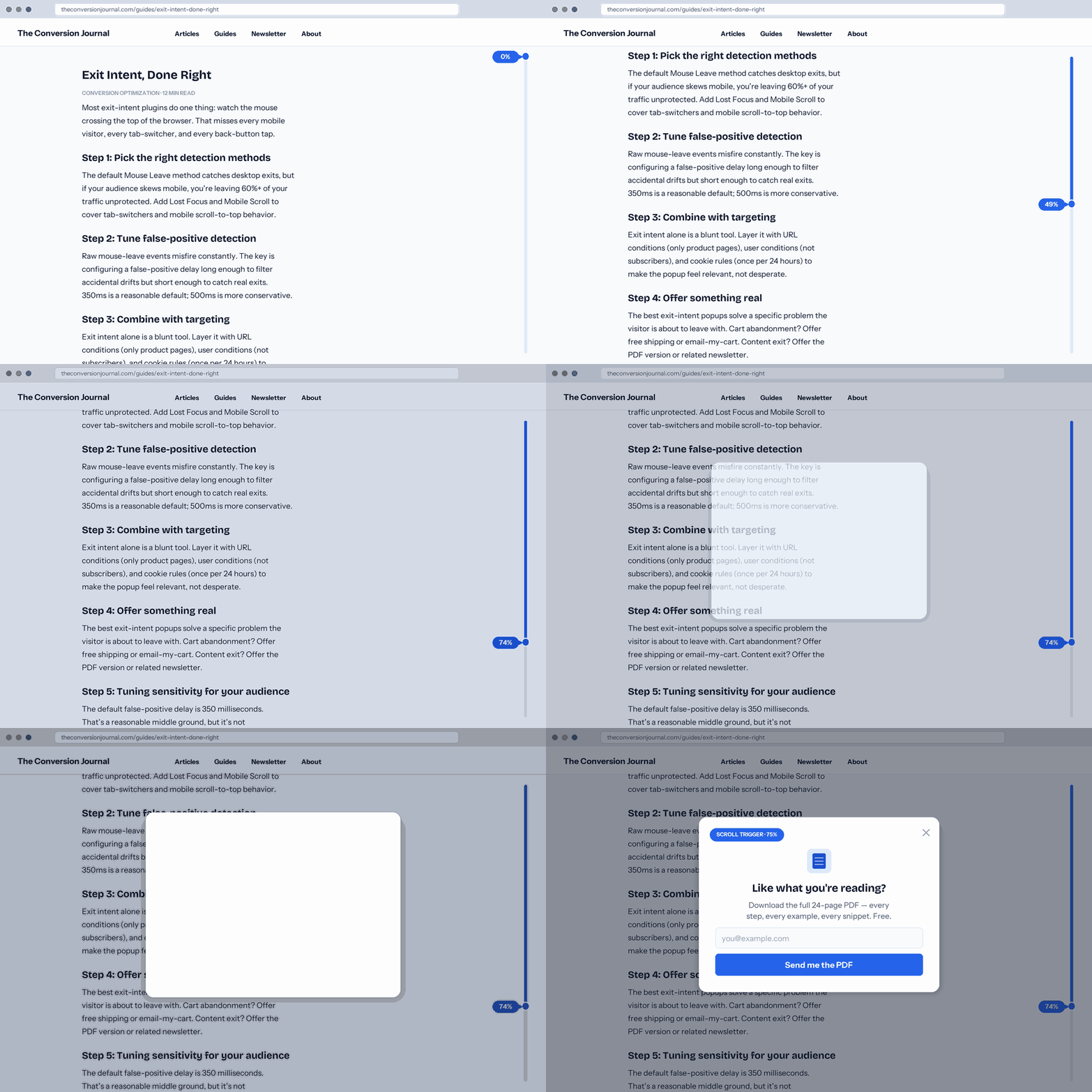
Fixed-time popups interrupt. Exit-intent popups wait. Scroll-triggered popups fire when the visitor has actually engaged — they’ve read this far, they’re invested, now’s the moment to offer something.
Popup Maker Pro’s scroll trigger ships with two models (distance or element) and four unit systems (%, px, rem, vh). Pick the one that matches how you think about your content.
Scroll trigger is a trigger you add to any Pro popup — it decides when the popup opens based on scroll position, while your targeting conditions decide who sees it.
Fire when the visitor has scrolled a specific amount. Use this when the trigger point is tied to the page as a whole — “fire halfway through,” “fire 800 pixels in,” “fire after one viewport.” Four unit systems cover every layout pattern.
Fire when a specific element scrolls into view. Use this when the trigger point is tied to content, not distance — “fire when the author bio appears,” “fire when the pricing table is reached,” “fire at the comparison section.”
Two ways to identify the element:
- CSS Selector — any valid CSS/jQuery selector.
.author-bio, #pricing-table, article > h2:nth-of-type(3). Target elements that already exist in your theme or content.
- Shortcode — drop
Most popups, once opened, stay open until dismissed. Scroll triggers offer a unique alternative: close when scrolling back up past the trigger point. The popup becomes a reveal-and-hide element tied to scroll position — scroll down past the trigger, popup appears; scroll back up past it, popup closes.
Useful for:
- In-article content upgrades — visible only in the section they’re relevant to
- Sticky context notifications — “You’re reading the beta docs” that dismisses when they scroll back to the overview
- Section-specific offers — a pricing popup that only shows while the pricing table is in view
Not for most conversion popups (the back-and-forth can feel restless), but uniquely valuable when the popup is contextual to a specific part of the page.
Default is 75% scroll distance — reasonable for article-length content where “read most of it” signals real engagement. But:
- For short pages (landing pages, product pages under 3 viewports), 75% may be too late. Try 50% or a
vh-based trigger (150vh = 1.5 viewports of scroll).
- For long pages (pillar articles, comprehensive guides), 75% may fire too late. 50-60% catches them mid-reading before they start thinking about leaving.
- For element triggers, “when the element first comes on screen” is the default-friendly pick. Use “completely revealed” only when you want the visitor to have read the triggering section first.
- Pair with cookies — “fire at 75%, but only once per session” keeps repeat visitors from being interrupted on every pageview.
Scroll triggers work best inside a layered setup:
- Exit Intent — scroll as primary (fires if they engage), exit intent as second-chance (fires if they don’t). Catches both engaged readers and quick bouncers with different offers.
- Popup Scheduling — run a scroll-triggered offer only during a promo window. Black Friday popup fires at 50% scroll, but only Nov 28 – Dec 1.
- Advanced Targeting — combine scroll trigger with URL, user role, referrer, cart state. Scroll-triggered cart-abandon popup: fires at 60% scroll and cart has items and not a returning customer.
- Analytics Dashboard — Pro reporting shows scroll-trigger impressions, conversion rate, and time-to-conversion, so you can tune the percentage or element based on real performance.