TL;DR: Exit‑Intent Popups at a Glance
Exit‑intent detects when a visitor is about to leave and displays a targeted, last‑chance message to win the conversion.
- Offer a timely discount to rescue carts.
- Give a content upgrade that matches the page topic.
- Reinforce trust with reviews or badges.
- Use real urgency with limited‑time or limited‑stock offers.
- Ask or assist to start a helpful conversation.
Benchmarks: Average popup conversion rates often land around 3–5%, while well‑optimized exit‑intent and cart‑abandonment popups can reach double‑digit rates. Results vary by offer, audience, and device.
Quick Start Checklist
- Install and activate the Popup Maker Exit‑Intent Popups extension.
- Create a new popup and add the Exit‑Intent trigger.
- Enable a cookie for frequency capping so users don’t see repeats.
- Keep default method settings; tailor design and copy to your offer.
- On mobile, avoid intrusive interstitials; use smaller, dismissible layouts.
- Publish, then A/B test headlines, offers, and cookie duration.
- Track conversions in your popup analytics and iterate.
How Exit Intent Popups Prevent Visitor Loss
If you’re here, chances are you’ve felt the frustration of seeing a visitor ready to leave your site without engaging at all. They’ve explored a few pages, maybe even tossed some items into their cart, and now they’re about to click away. That’s where an exit‑intent popup can work its power by presenting a compelling offer just as they’re about to leave.
Exit‑intent popups give you a last chance to connect with visitors before they leave. Using the right strategy can change a bounce into a conversion.
If you’re new to exit intent popups, read this first.
Everything You Ever Wanted To Know About Exit Intent Popups
Digital marketers who’ve used exit‑intent popups report impressive results. As Alex Chris, Digital Marketing Manager and founder of Reliablesoft reports, his exit‑intent popup converts at 10%+. He shares:
“I know that some people don’t like pop-ups or flyout boxes, but when it comes to growing an email list, they are the most effective tools you can safely use … This pop-up (Chris’ exit intent sign-up popup) has a more than 10% conversion rate for my website. This means that out of the 100 people who see the pop-up, 10 register for my newsletter.”
In this guide, we’ll dive straight into five proven strategies that can transform your exit‑intent popups into powerful conversion tools. You’ll read about useful methods like well-timed discounts and strong content upgrades. These have helped businesses increase conversions and build email lists.
If you’re looking at buying our Exit Intent Popups addon or are already a proud owner, you’ll find a quick‑start guide at the end of this post.
Five Proven Strategies to Convert Abandoning Visitors
Each of these approaches not only targets different visitor motivations but also aims to enhance your conversion rate. Depending on your business model and audience, you may find certain strategies more effective than others.
Let’s explore your options for crafting the perfect exit popup to maximize conversions.
1. Offer a Special Discount or Incentive
Nothing captures attention quite like a well-timed discount. This approach is particularly effective if you’ve got an e-commerce site and are dealing with cart abandonment. The average documented online shopping cart abandonment rate in 2025 is 70.22%, so a timely incentive can be the nudge that prevents a lost sale.
When a visitor with items in their cart shows exit intent, a popup offering a limited-time discount can provide just enough incentive to complete the purchase. For example: “Wait! Here’s 10% off your order if you complete your purchase now.”
Recent case studies highlight the impact: Kiss My Keto decreased cart abandonment by 20%, and Indestructible Shoes improved ecommerce conversion by 13.2% after implementing targeted campaigns with exit-intent and related tactics.
- Use when: High cart abandonment or discount‑sensitive audiences searching for a cart abandonment popup.
- Trigger: Exit‑intent on cart/checkout; add cookie frequency capping to limit repeats.
- Offer: Percentage off, free shipping, or a bundle; personalize by cart value.
- Success metric: Checkout completion rate and revenue per user from exit‑intent popup.
2. Provide a Content Upgrade or Free Resource
For content-focused websites, offering additional value through a free resource related to the content your visitor was just reading can be highly effective.
If someone reads your blog post about social media marketing, an exit‑intent popup can help. It can offer a free checklist or template related to the topic. This can turn a visitor who is leaving into a lead. Messages such as: “Before you go, grab our free social media content calendar template to implement what you’ve just learned.” are worth (A/B) testing.
This method gives immediate value. It also helps divide your audience by their interests. This allows for more focused follow-up messages.
- Use when: You want to grow email fast with exit‑intent popup examples tied to content.
- Trigger: Exit‑intent on long‑form posts; optional time‑on‑page fallback.
- Offer: Checklist, template, or mini‑course that matches the page topic.
- Success metric: Lead conversion rate and downstream engagement (opens/clicks).
3. Show Social Proof or Trust Signals
Sometimes visitors leave because they’re uncertain about your credibility. Addressing this hesitation directly with social proof can be remarkably effective.
Include testimonials, review counts, or trust badges in your exit popup to provide reassurance at the critical moment when a visitor is considering leaving. For example: SaaS — “Join 14‑day trial, no card required”; Fashion — “Unsure on size? See our fit guide and get 10% off”; B2B — “See how a peer cut onboarding time by 32% — download the 2‑page case brief.”
This strategy works by using a psychological idea. People tend to follow what others do. This is especially true when they are unsure about decisions.
- Use when: New visitors or high‑consideration products need reassurance.
- Trigger: Exit‑intent sitewide; add scroll‑depth conditions on product pages.
- Offer: Ratings, badges, guarantees, and short quotes.
- Success metric: Click‑through to PDP/checkout and assisted conversions.
4. Create Urgency or Scarcity
The fear of missing out (FOMO) is a powerful motivator. By incorporating elements of urgency or scarcity in your exit popups, you can encourage immediate action.
Limited-time offers countdown timers, or low-stock notices create a sense that delaying a decision might mean missing an opportunity. For example: “Hurry, only 5 items left at this price!” or “This special offer expires in 24 hours.”
For this approach to maintain its effectiveness, ensure your urgency claims are genuine—false scarcity can damage trust and harm your brand’s reputation in the long run.
- Use when: Time‑sensitive promos or limited inventory.
- Trigger: Exit‑intent on promo landing pages; add session‑based limits.
- Offer: Countdown, tiered discount, or limited‑stock message.
- Success metric: Conversions within offer window and average order value.
5. Engage with a Question or Offer Help
Sometimes the most effective approach is simply to start a conversation. Using your exit popup to ask a question or offer assistance can re-engage visitors who haven’t found what they’re looking for.
Think about messages like: “Is there something specific you couldn’t find today?” or “Would you like to chat with one of our experts before you go?” This approach shows genuine interest in solving the visitor’s problem rather than just pushing for a conversion.
Service-based businesses can use this chance to get feedback. They can also connect visitors with their support team. This can turn visitors who might leave into valuable conversations.
- Use when: Support‑driven funnels or high‑touch sales.
- Trigger: Exit‑intent with chat handoff or short survey.
- Offer: Live chat, schedule a call, or one‑question poll.
- Success metric: Conversations started and qualified leads generated.
Transforming Exits into Opportunities
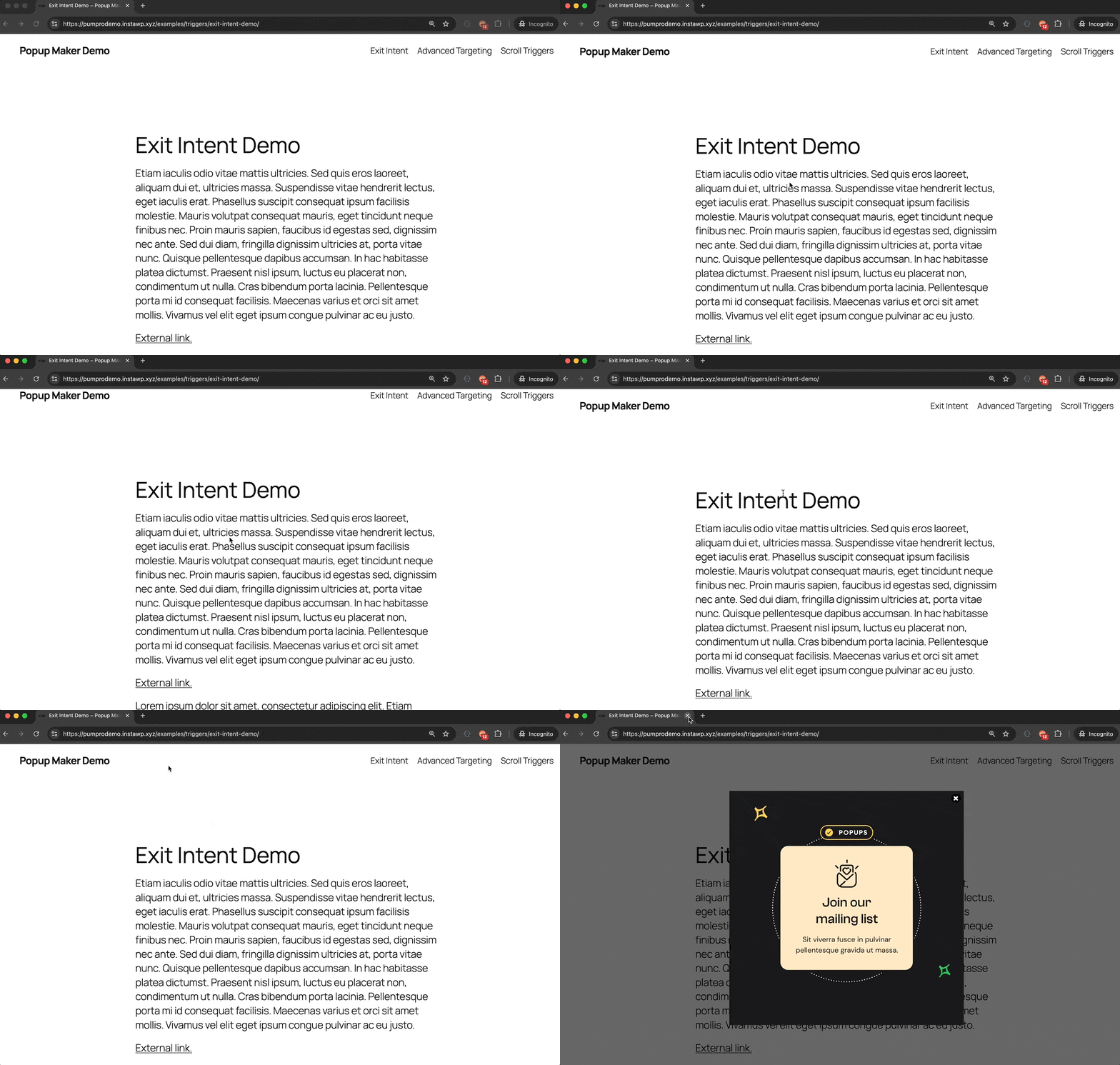
Exit‑intent popups represent a unique opportunity to recover visitors at the critical moment when they’re about to leave your site. By giving the right offer, timing it well, and respecting the user experience, you can change possible losses into valuable conversions.
If you want to increase sales, grow your email list, or improve site engagement, exit‑intent popups can help. Benchmarks from large datasets show that average popup conversion rates hover around 3–5%, while highly optimized exit‑intent and cart‑focused campaigns can reach double‑digit rates in some cases. Results vary by offer, audience, and device.
The best exit‑intent popups help visitors with their needs. They do not just interrupt their visit. By focusing on providing value and solving problems, your exit popups can become a welcome part of the user experience rather than an annoyance.
Are you ready to implement these strategies on your own site? With the right approach and tools, your exit‑intent popups can become one of your most effective conversion optimization techniques. Read on to get started now.
Benchmarks & Compliance (2025)
Cart abandonment baseline: Industry aggregations place average abandonment around 70% (e.g., Baymard’s 2025 baseline at 70.22%). Use this as a directional benchmark for cart‑focused exit‑intent campaigns.
Popup benchmarks: Many datasets report average popup conversion rates in the low single digits, with exit‑intent popup examples and cart‑abandonment popups frequently outperforming general list‑building popups. Aim to beat your own site baseline via A/B testing popups and improved offers.
Compliance & mobile policy: Google Search’s intrusive interstitials policy discourages overlays that block content on mobile right after a search click. Use smaller, easily dismissible designs, delay triggers, and server/client controls for display rules. Modern browsers also limit custom text in beforeunload dialogs; rely on mobile exit‑intent signals and cookies instead of disruptive prompts.
Mobile Exit‑Intent: Supported Triggers & Patterns
Desktop exit‑intent often relies on fast cursor movement toward the browser chrome. On mobile, mix multiple signals to approximate intent without harming UX:
- Back‑button intercept: Show a lightweight banner or slide‑up when users tap back from cart/checkout. Keep it dismissible.
- Lost focus / tab switch: Trigger a reminder when the page loses visibility state; cap with cookies.
- Scroll velocity & direction: Detect rapid upward scrolls near the top to reveal an offer before exit.
- Inactivity + time delay: If no interaction after a set time, present a helpful prompt rather than an immediate interstitial.
- URL/route change: When navigating away from key steps, trigger a small, compliant notice with a save‑cart or discount option.
Whichever pattern you choose, set cookie frequency capping, limit impressions per session, and adapt copy/size for mobile. This protects UX and aligns with platform expectations.
Getting Started with Exit Intent Popups
Use these steps to get started and launch your first exit‑intent popup quickly and confidently.
Choose the Right Popup Tool
Before diving into creation, it’s vital to select a tool that aligns with your needs. There are several options available, each offering unique features such as customization capabilities, A/B testing, and analytics tracking. Popular tools include Popup Maker, Sumo (BDOW!, formerly Sumo) List Builder remains active with popup features, and Picreel. Evaluate your budget, technical capabilities, and desired features to select the best fit for your business. On mobile, avoid intrusive interstitials that block content immediately after a search click; opt for smaller, easily dismissible banners or delayed triggers. Modern browsers also limit aggressive “leave” alerts—custom text in beforeunload dialogs isn’t supported—so rely on mobile‑specific exit signals and cookies instead of disruptive prompts.
Tailor Your Popup Design
A well-crafted popup should catch the eye but not disrupt the user experience. Focus on:
- Simplicity: Less is more. Avoid clutter and keep the message clear and concise.
- Brand Consistency: Use colors, fonts, and language that align with your overall brand identity.
- Responsive Design: Ensure your popup is mobile-friendly to cater to an audience browsing on various devices.
Craft Compelling Offers
The offer is the heart of your popup. To convert visitors, you need to present them with a compelling reason to engage further with your site. The key to a successful offer is ensuring it aligns with the visitors’ interests and needs while being persuasive enough to prompt action. Here are some strategies for crafting irresistible offers:
1. Discounts and Coupons
Offering a discount or coupon is one of the most effective ways to capture the attention of a leaving visitor. Whether it’s a percentage off their first purchase, free shipping, or a time-limited promotion, a financial incentive can be persuasive. Clearly display the value they’ll gain to encourage immediate redemption.
2. Free Trials or Samples
For businesses offering services or subscription-based products, offering a free trial can entice users to experience your product without commitment. Similarly, product-based businesses can leverage free samples to showcase the quality of their offerings.
3. Valuable Content
Access to exclusive content such as eBooks, guides, or webinars can be especially appealing to visitors seeking solutions or insights. Ensure that the content is highly relevant and provides actionable value that aligns with their interests.
4. Loyalty Programs
Promote the benefits of joining a loyalty program, such as earning points for discounts on future purchases or gaining early access to new products. Highlighting the exclusive perks and personalized rewards that come with membership can motivate visitors to stay connected with your brand. By providing a sense of belonging and value, loyalty programs can turn a fleeting visitor into a long-term customer. You can offer additional points or a special welcome offer as an immediate incentive for signing up.
5. Exit Surveys and Feedback
Lastly, leverage exit‑intent popups to gather valuable feedback through surveys. By inviting leaving visitors to share their experience or reasons for leaving, you gain insights into potential areas of improvement. Keep surveys short and straightforward, possibly offering a small incentive for their time, like a discount on future visits. This not only helps in understanding visitor behavior but also shows that you value their opinion, potentially encouraging them to return.
Quick Start Guide to Creating Exit Intent Popups With Popup Maker
After purchasing and installing the Popup Maker Exit Intent Popups extension, follow these steps.
1. Click Create Popup under the Popup Maker menu

2. Click Add New Trigger

3. Select Exit Intent from What kind of trigger do you want

4. When adding the Exit‑Intent trigger, check “Set up a cookie” and link it to the trigger so visitors don’t see the same popup repeatedly, then click Add

5. Keep the default Method settings and Cookie Name and click Add

6. Click Publish to save your popup and make it go live

7. Test
- Bring up a post or page.
- After it finishes loading in the browser, move your cursor as if you’re going to close the tab.
- You should see your Exit Intent Popup display!
Note: We didn’t create a targeting rule, so your popup should display on any post and page. If you need to retest, remember to clear your popup’s browser cookie before each test run.
For more details, visit our Introduction to the Exit Intent Popups Extension help guide.