
Opens in a new tab

🚀 Stop Losing Visitors — Turn Traffic into Revenue with Popup Maker Pro →

Get Started

Visual Composer Integration

Compose Popup Content in Visual Composer

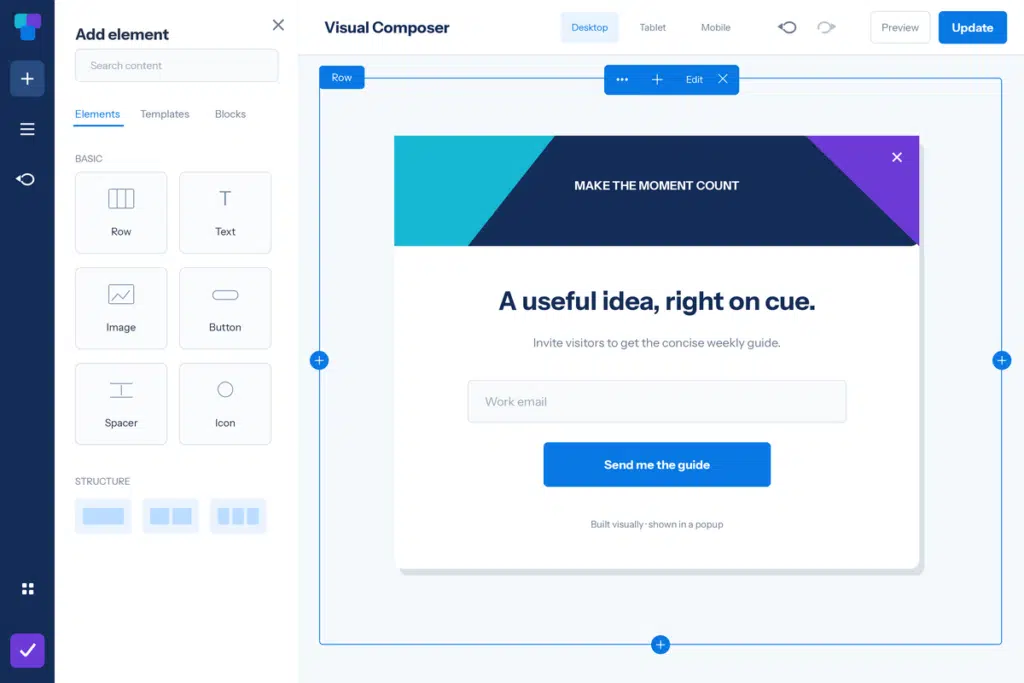
Use the Frontend Editor, Add Content library, Tree View, and responsive controls for the inner layout. Keep the popup frame and delivery rules in Popup Maker.

Simplified Visual Composer editor showing popup content and element controls.

Popup Maker + Visual Composer

Build Visual Composer popups in the live canvas your team already uses for site content. Arrange sections, rows, columns, and elements, pull available Templates or Blocks through Add Content, and use Tree View to stay oriented inside a compact campaign.

This integration covers Visual Composer Website Builder from visualcomposer.com, not WPBakery Page Builder. Visual Composer owns the inner document; Popup Maker owns the theme, overlay, close control, dimensions, triggers, targeting, and cookies. Visual Composer Premium’s own Popup Builder is a separate alternative, not a second settings layer for the same campaign.

Build Better Visual Composer Popups

Review the official Visual Composer resources, then use Popup Maker targeting and popup triggers to show the finished design to the right visitors at the right time.

More Page Builder Integrations

Explore other visual builders supported by Popup Maker:

Frequently Asked Questions

  • Does Popup Maker work with Visual Composer Website Builder?

    Yes. Save a Popup Maker popup, open it in Visual Composer’s Frontend Editor, and build the inner layout with Visual Composer rows, columns, and elements.

  • Is Visual Composer Website Builder the same as WPBakery Page Builder?

    No. They are separate WordPress plugins with different editors and content systems. This page covers Visual Composer Website Builder from visualcomposer.com.

  • Is Visual Composer popup editing included in Popup Maker Free?

    Yes. Direct Visual Composer editing is part of Popup Maker’s free core plugin. Your Visual Composer plan determines which Elements, Templates, Blocks, and add-ons you can use, and optional Popup Maker extensions keep their own feature tiers.

  • Can I use Visual Composer Hub Elements, Templates, and Blocks in a Popup Maker popup?

    Use the content already available to your Visual Composer site and plan through the Add Content window. Adapt page-sized layouts to the smaller popup frame, and test interactive or third-party elements on the finished frontend page.

  • Why don't I see the Visual Composer editor for my popup?

    Open Visual Composer Dashboard and check Role Manager. Enable Visual Composer for Popups for the intended role, then confirm that user also has normal WordPress permission to edit the popup.

  • Should I also configure Visual Composer Popup Builder for the same campaign?

    Treat Visual Composer Premium’s Popup Builder as a separate popup system. For this integration, build the inner document in Visual Composer and keep the frame, triggers, targeting, and cookies in Popup Maker so one system owns delivery.

  • Will a Visual Composer form automatically become a Popup Maker conversion?

    Not through page-builder compatibility alone. A form can render inside the popup without proving close-on-success, submission triggers, cookies, or conversion tracking. Configure and test the form integration you intend to use.

Details

Visual Composer

IntegrationFree

Build Visual Composer popups with the Frontend Editor, Add Content library, responsive controls, and role access while Popup Maker manages the frame and delivery.

Get StartedDocumentation

Quick Links

Easy Installation

Create your first popup in minutes

Proven Support

Help is available when you need it.

Docs That Help

Help is available when you need it.

Ready to start poppin’?

Popups that don’t stop

If your ready to supercharge your site's popups, you'll want to check out our exciting list of premium features

Buy Now